How to Replace a Treadmill Belt: A Model-Specific Guide
The short answer: replacing a treadmill walking belt usually means removing model-specific covers and rails, releasing the rear roller, freeing the front roller or one side of the deck, sliding the old belt off, and rebuilding the machine around the correctly matched new belt. The safe sequence is not universal.
This is a more involved repair than centering or lubricating a belt. Some treadmills expose an RPM sensor, drive belt, motor bracket, folding frame, wiring, or a heavy deck during the job. Horizon's own replacement procedure, for example, includes marking both roller positions, removing the RPM sensor and front roller, and warning that the frame may rise when deck weight is removed.
Use this guide to decide whether replacement is actually needed, order the right part, and control the repair. For the exact screw locations, component order, lubrication amount, and final tension specification, your model's service instructions take priority.
Does the Walking Belt Need Replacement?
Do not order a belt solely because it drifts, slips, or feels dry. Those symptoms can come from alignment, tension, lubrication, deck wear, a drive-belt problem, or an electrical fault. Start with the visible condition of the walking belt and the maintenance history.
| What you observe | Most useful next step | Why |
|---|---|---|
| Torn surface, exposed fabric, separated seam, folded edge, or deep fraying | Stop using the treadmill and confirm a replacement belt for the exact model. | Structural damage can catch on a rail or roller and worsen under load. |
| Smooth, shiny, hardened, or heat-damaged underside plus persistent friction | Inspect the belt and deck together; ask whether both are worn. | A new belt on a damaged deck can wear rapidly and may not solve high friction. |
| Belt drifts to one side but has no material damage | Level the treadmill and follow the model's centering procedure first. | Tracking is normally an adjustment issue, not proof that the belt is worn out. |
| Centered belt slips underfoot | Check the specified tension, surface contamination, deck condition, front drive belt, and pulley. | Repeatedly tightening a worn or misdiagnosed system can overload components. |
| Belt slows, surges, smells hot, or the treadmill shuts down | Stop and diagnose friction, power, motor, controller, sensor, and belt/deck condition. | The walking belt may be involved, but replacement is not a complete diagnosis. |
| The top looks good but lubrication is overdue | Read the manual before adding anything. | Some models use routine silicone; others use proprietary, pre-waxed, or maintenance-free systems. |
Match the Belt to the Exact Model and Version
Belt width and length are not enough to prove compatibility. The backing material, seam, thickness, surface, lubrication system, and production revision can matter. Find the complete model number and serial number on the frame label before shopping.
- Record the full model number. Include suffixes, revision letters, or digits after a decimal. A familiar retail name can cover several versions.
- Open the manufacturer's parts diagram. Identify the walking belt by its official part name and part number. iFIT's parts guidance, for example, tells owners to select the full model number and use the matching manual or product diagram.
- Check the production range. Confirm that the part applies to the serial-number or manufacture-date range on your machine.
- Verify what is included. A listing may contain only the walking belt—not lubricant, deck hardware, roller bolts, or side-rail fasteners.
- Read the warranty terms before disassembly. A covered repair may need an authorized technician. Keep the old part and packaging until the machine passes its final checks.
Decide Whether This Is a DIY Repair
A belt replacement is reasonable only when you have the model-specific procedure, the correct tools, enough floor space, and a safe way to control the deck and frame. Depending on the design, the job can require loosening the motor bracket, moving the drive belt, disconnecting a speed sensor, or supporting a heavy deck.
| DIY may be reasonable when | Use an authorized technician when |
|---|---|
| The manufacturer supplies a clear procedure for your exact model. | The manual restricts internal service to qualified personnel or the repair affects warranty coverage. |
| All fasteners are accessible and you can identify the walking belt, drive belt, rollers, deck, and sensor. | Wiring, a controller board, incline mechanism, spring-loaded frame, or unfamiliar sensor must be moved. |
| You can support the deck and keep the frame from moving as instructed. | The deck is too heavy to control or the folding frame can rise, fall, or pinch. |
| The bolts turn normally and the frame, rollers, and mounting holes are undamaged. | A bolt is seized or stripped, a roller is bent, the frame is cracked, or mounting holes are distorted. |
| The problem is limited to a clearly damaged belt and the deck passes inspection. | There is a burning smell, visible heat damage, repeated shutdown, breaker trip, or uncertainty about motor/controller load. |
Tools, Documentation, and Workspace
- The exact owner or service instructions and the correct replacement walking belt.
- The specified hex keys, sockets, wrenches, and screwdrivers. Horizon's general replacement document lists a T-wrench, 5, 6, or 8 mm hex key, 13 mm socket or open wrench, Phillips screwdriver, and tape; your model may differ.
- Painter's tape and a marker for indexing bolt positions and labeling connectors or hardware.
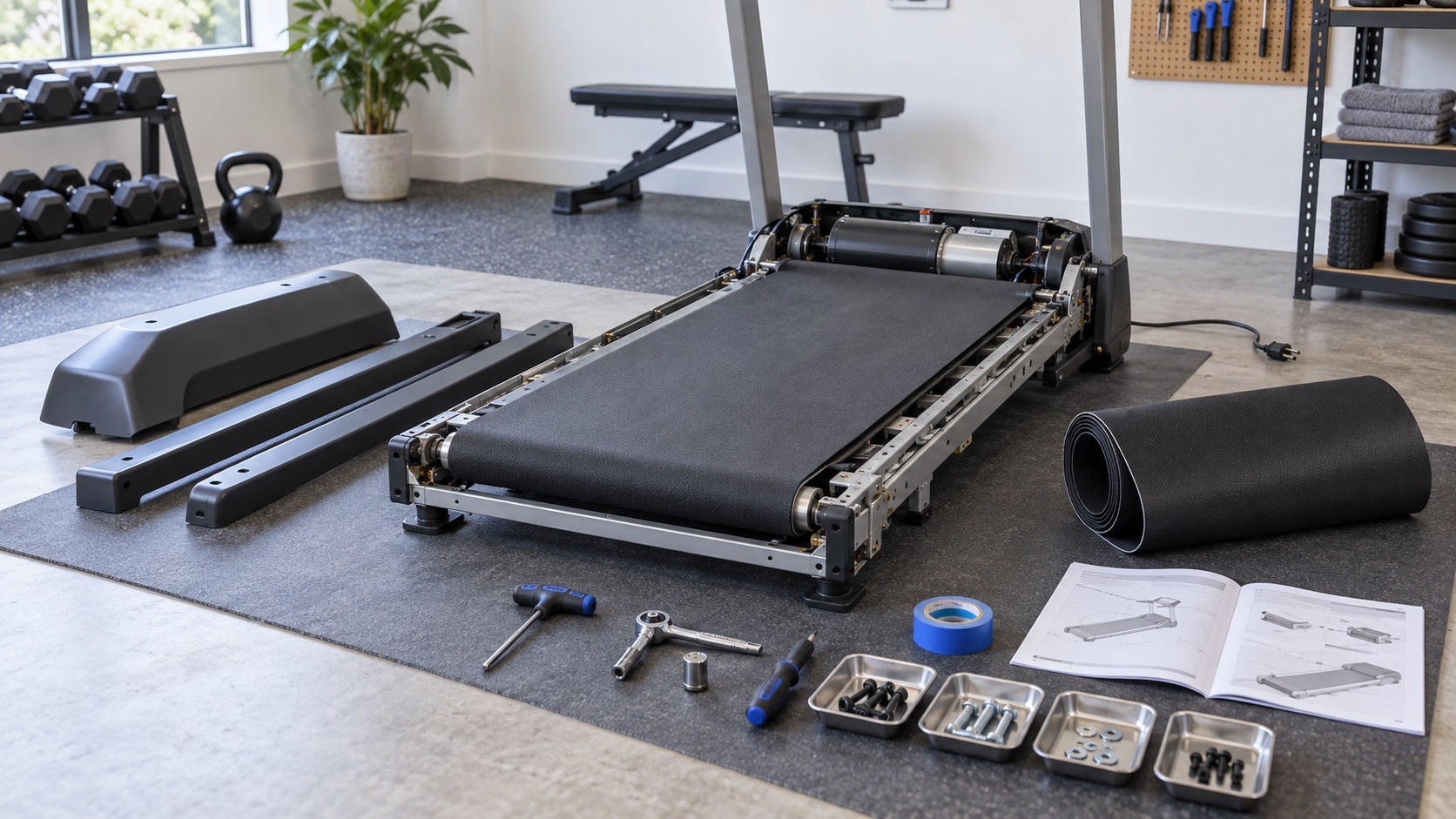
- Small trays or bags organized by motor hood, end caps, rails, deck, front roller, and rear roller.
- A phone or camera for a photo before each layer is removed.
- Stable deck support and a second adult if the procedure calls for lifting or controlling the frame.
- Only the model-approved lubricant and only if the installation instructions call for it.
Lower the incline to the specified service position, remove the safety key, switch the treadmill off, unplug it from the wall, and let the machine stop completely. Leave enough space to lay long rails and rollers down without bending or stepping on them.
Create a Baseline Before Loosening Anything
The original roller and motor positions give you a useful starting point during reassembly. They are not a substitute for the final specification, but losing them makes the job harder.
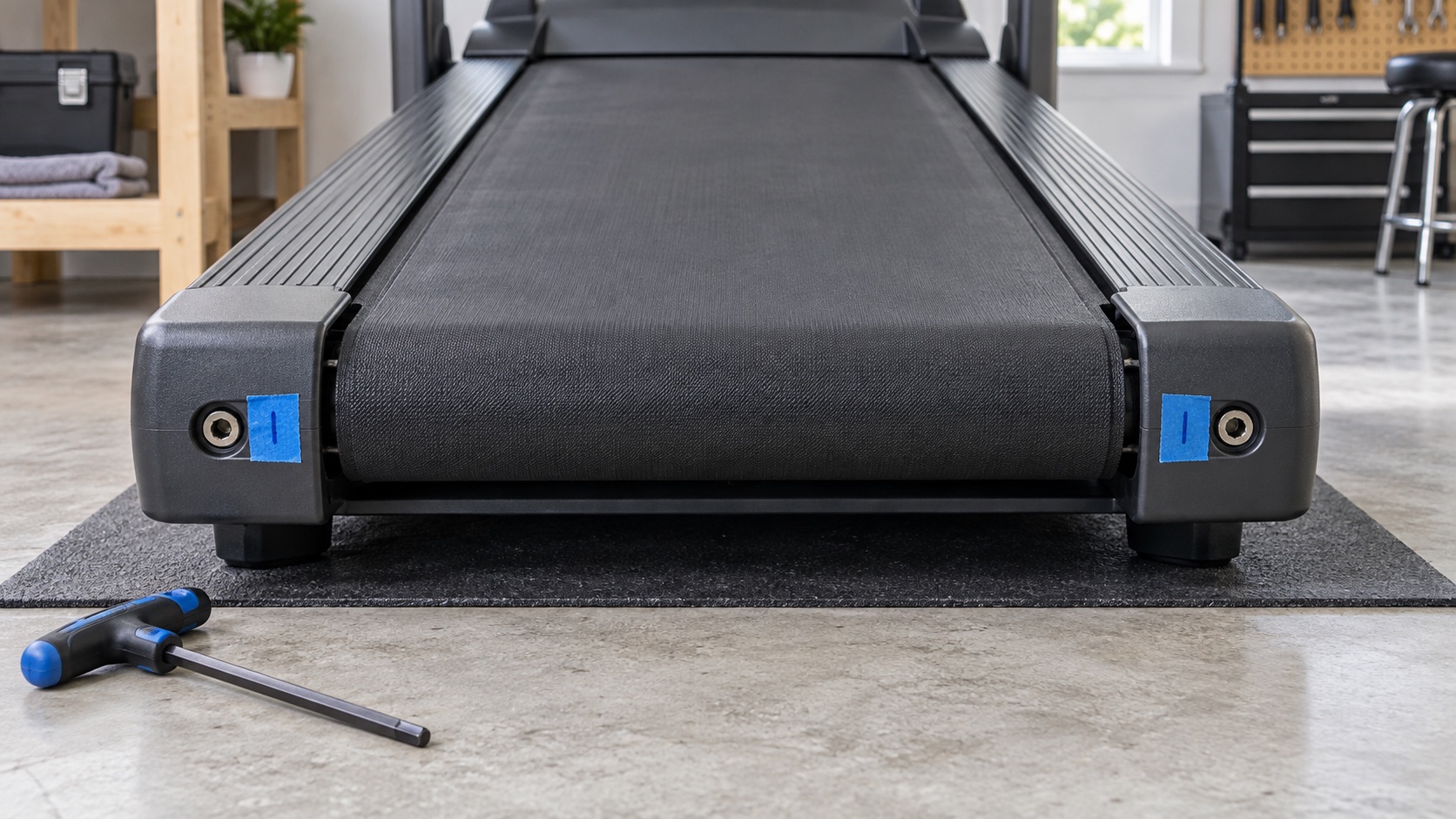
- Photograph both rear adjustment bolts straight on.
- Place a small tape index beside each bolt and mark its starting orientation.
- Count and record every turn used to release the left and right rear bolts.
- If the procedure moves a front roller or motor bracket, mark those positions separately before loosening them.
- Photograph the drive-belt route, sensor location, washers, spacers, and cable clips.
- Check the new walking belt for a directional arrow or a designated inside surface before unrolling it.
Horizon explicitly instructs technicians to mark the rear-roller bolt placement, front-roller bolt placement, and motor-bracket bolt position in its general belt-and-deck replacement document. That habit is valuable even when another model uses a different removal sequence.
How to Replace the Treadmill Walking Belt
The phases below describe the logic of the repair. Use the exact component order, fastener locations, torque values, belt direction, and lubrication quantity in your model's instructions.
1. Remove only the covers and rails in the service sequence
Most procedures begin with the motor hood, rear end caps, and side or guide rails. Keep screws with their original assembly; similar-looking fasteners may have different lengths and can damage the deck or cover if swapped.
2. Release rear-roller tension evenly
After marking the baseline, back out the left and right rear adjustments by the recorded amounts. Remove the rear roller only when the model procedure calls for it. Do not let a free roller fall against the frame or pull on nearby wiring.
3. Free the front of the belt using the model-specific method
Some treadmills require front-roller removal and release of the motor drive belt. Others let the walking belt slide out after deck bolts on one side are removed. On the Horizon procedure cited here, the RPM sensor and front roller are moved, while only the right-side deck bolts need removal for a belt-only replacement. Do not assume that shortcut applies to another machine.
4. Control the deck and frame
Support the deck before removing load-bearing fasteners. Horizon warns that its frame may rise when deck weight is removed. Watch for lift-assist hardware, springs, shocks, pinch points, and cable routing.
5. Remove the old belt and inspect the parts it contacted
Slide the old belt off without forcing it across sharp brackets. Inspect both deck faces if the deck is reversible, the front and rear rollers, bearings, guides, fasteners, and frame. Look for grooves, blistering, delamination, rough roller surfaces, seized bearings, or residue from an incorrect lubricant.
6. Install the new belt in the correct direction
Match any directional marking and confirm that the textured walking surface faces outward. Route the belt flat around the rollers with no twist. Keep it away from sharp edges, exposed threads, oil, and dirty flooring.
7. Rebuild from the inside out
Return the deck, front roller, drive belt, sensor, brackets, and wiring exactly as documented. Restore marked positions as a starting point, then use the manual's final alignment and tension procedure. Rotate accessible components by hand only when the service instructions permit it and the machine is unplugged.
8. Lubricate only when the new belt instructions require it
Some replacement procedures call for a specified amount of silicone on the deck; other belts use a different treatment or arrive pre-lubricated. Do not copy the quantity from another brand. Our treadmill lubrication guide explains the model check.
9. Refit guards before powered testing
Do not run the machine with hands, tools, tape, loose hardware, or clothing near an exposed roller or drive system. Install the required guards and confirm that cables cannot contact a moving part.
First Start: Test Without Sacrificing the New Belt
- Perform a tool and hardware count. No loose fastener, tape strip, cable, or tool should remain inside the treadmill.
- Confirm the belt can move freely. Use only the manual-approved check; do not force a roller or belt against motor resistance.
- Stand on the side rails for startup. Insert the safety key and start at the lowest specified speed without anyone on the walking belt.
- Watch from a safe position. Check the side gaps, belt seam, roller path, drive-belt path, and sound. Stop immediately for rapid drift, rubbing, binding, surging, grinding, smoke, or an electrical odor.
- Center the belt in small steps. Follow the exact model procedure. Do not make large corrections while the new belt is settling.
- Set tension to the model standard. Restore the baseline only as a starting point, then use the published lift, deflection, or functional-slip test.
- Complete the specified distribution run. If lubricant was required, use the unloaded time and speed in the replacement instructions.
- Add load gradually. Walk briefly at a conservative speed, then stop and recheck tracking, heat, fasteners, and belt condition.
A new belt may need a follow-up alignment or tension check after its initial use, but it should not require repeated heavy tightening. See our treadmill belt adjustment guide for the difference between tracking and tension corrections.
Troubleshooting After Belt Replacement
Use the first test to isolate the system, not to force the treadmill through a problem.
| What happens | Check first | Do not do |
|---|---|---|
| New belt moves quickly toward one rail | Belt routing, rear-roller seating, left/right baseline, frame level, and model centering procedure. | Do not let the edge fold or rub while you keep testing. |
| Belt is centered but slips underfoot | Final tension specification, roller installation, surface contamination, and whether the slip is actually at the motor drive belt. | Do not tighten only one rear bolt or add multiple full turns. |
| Motor runs but walking belt does not | Drive-belt routing and tension, front-roller pulley, key/clip, and any connector moved during service. | Do not reach beneath an open hood while powered. |
| Speed reading is erratic or an error appears | Speed/RPM sensor position, magnet alignment, cable routing, and model calibration instructions. | Do not guess at sensor gaps from another model. |
| Belt slows or the machine shuts down under load | Walking-belt tension, lubrication system, deck condition, household circuit, motor load, and controller diagnostics. | Do not keep increasing belt tension. |
| New scraping, thumping, or grinding sound | Seam path, belt twist, roller bearings, loose guards, trapped hardware, and belt/rail contact. | Do not continue the break-in run until the source is found. |
| Deck or belt becomes unusually hot | Friction, lubricant compatibility, belt direction, deck wear, and over-tension. | Do not add random lubricant or continue using the treadmill. |
Common Replacement Mistakes
- Ordering by size instead of the full model and part number. Similar dimensions do not guarantee the same backing, seam, or lubricant system.
- Replacing a walking belt when the drive belt is the part slipping. Confirm where motion is being lost.
- Skipping the deck inspection. A rough or worn deck can damage the replacement belt and keep friction high.
- Failing to mark the roller and motor positions. Reassembly becomes guesswork, especially when several tension systems were loosened.
- Mixing screws and spacers. A longer screw in the wrong hole can contact a moving part or damage a cover.
- Installing the belt backward or twisted. Check directional markings and both belt surfaces before tightening anything.
- Using a universal lubricant or universal amount. Belt systems differ; follow the new belt and treadmill instructions together.
- Starting at running speed. Initial checks should be unloaded and at the specified low speed.
- Using tension to hide an installation fault. Extra tension cannot correct a crooked roller, damaged deck, misrouted drive belt, or displaced sensor.
Record the Repair and Protect the New Belt
- Record the belt part number, treadmill model and serial number, installation date, and any lubricant used.
- Save the before-and-after bolt counts, photos, receipts, and packaging.
- Check alignment and tension after the initial use and again at the interval in the service instructions.
- Keep the walking surface clean and the treadmill level; do not spray cleaner beneath the belt or into the motor area.
- Follow the new belt's maintenance schedule rather than automatically continuing the old one.
- Investigate repeated drift, slip, heat, or shutdown instead of treating constant adjustment as normal.
The belt, deck, rollers, motor, and controller operate as one friction-and-drive system. The best replacement is not merely one that moves—it stays centered, supports load without slipping, and does not create excess heat or strain.
Sources and Manufacturer Guidance
Requirements can vary by product, model, and situation. These primary sources informed this guide; official instructions for your exact product and current authoritative guidance take priority.
Frequently Asked Questions
-
Sometimes. It is a realistic DIY repair when the manufacturer provides instructions for your exact model and you can safely support the deck, control the frame, identify the rollers and drive system, and complete the final alignment and tension checks. Use a technician when the job involves unfamiliar wiring, a controller, a spring-loaded frame, damaged hardware, or warranty restrictions.
-
Use the full model number, version or production code, and serial number to find the manufacturer's parts diagram. Match the official walking-belt part number and confirm any production range. Do not rely only on belt width and length.
-
Not automatically, but inspect them together. Replace or professionally evaluate a deck that is grooved, blistered, delaminated, rough, heat-damaged, or outside the manufacturer's wear specification. A damaged deck can rapidly wear a new belt.
-
Some do and some do not. Follow both the treadmill instructions and the replacement belt instructions. The correct substance, quantity, and distribution procedure can differ, and some systems are pre-lubricated or maintenance-free.
-
Use the exact model specification or functional test. A marked pre-repair position is only a starting point. Do not use a universal lift measurement because published specifications vary by treadmill.
-
Possible causes include a rear roller restored unevenly, a front roller or deck not seated correctly, a twisted or misrouted belt, an unstable floor, or use of the wrong centering method. Stop before the edge rubs or folds and verify assembly before making repeated adjustments.
-
There is no reliable universal time. A simple design with clear instructions may take an experienced person a few hours, while a heavy folding treadmill or a job that includes deck, roller, sensor, or drive-belt work can take longer and may require a technician. Plan for careful labeling and testing rather than a deadline.
-
Only when the exact service instructions require that test and explain the safe procedure. Exposed drive components and electrical parts create entanglement and shock hazards. For normal user testing, refit the required guards first.